
Overview
We have introduced several improvements to the campaign date range filter, providing greater flexibility in how users filter and analyse campaign data.
What’s New
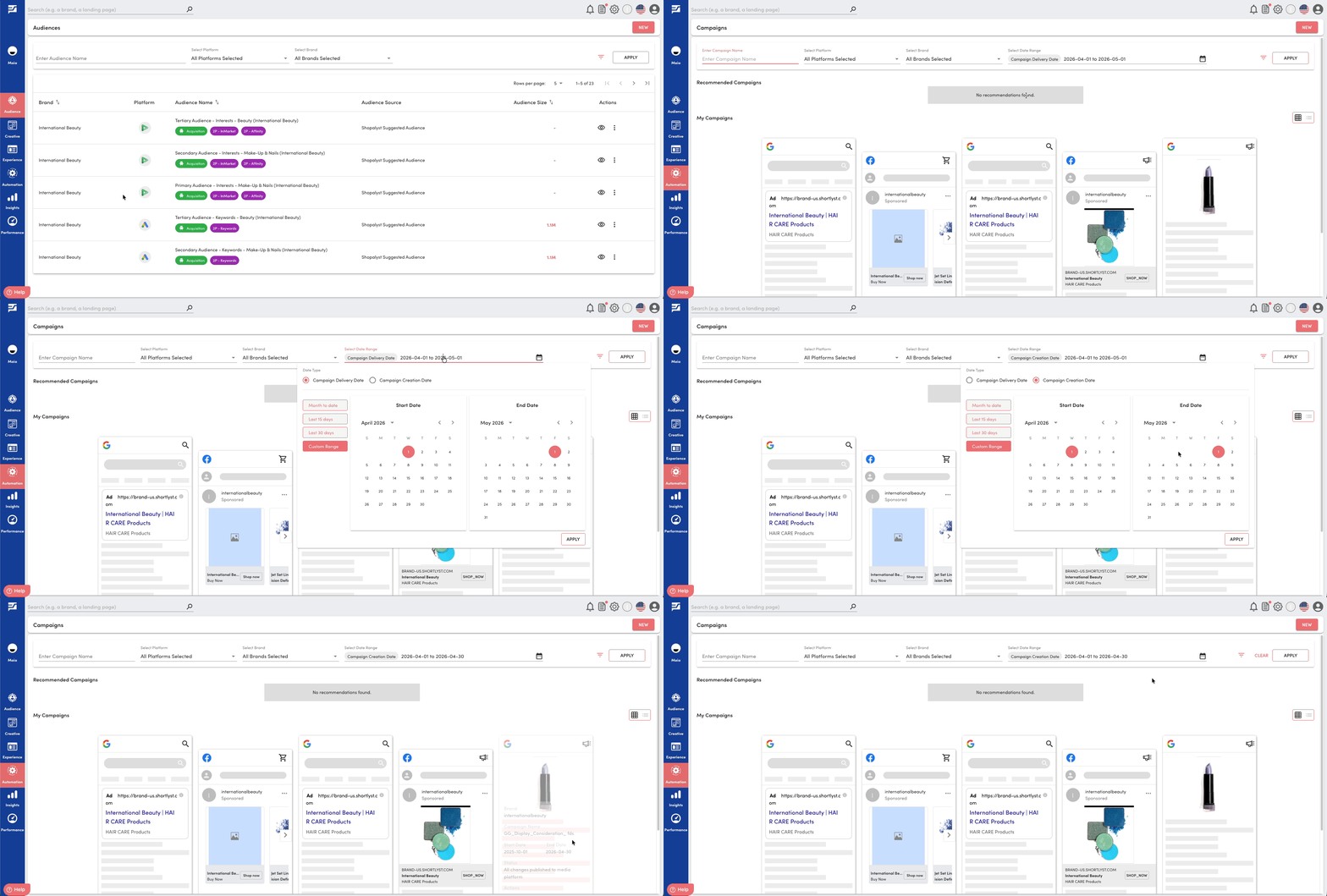
Multiple Date Range Types
Users can now choose the type of date range to filter campaigns, allowing filtering based on either:
- Campaign Delivery Date Range to analyse performance within a delivery window
- Campaign Creation Date to track campaigns based on when they were created
Improved Date Range UI
The date range selector has been enhanced for better usability and flexibility:
- Select custom start and end dates for precise filtering
- Use preset options such as Month to Date, Last 15 Days, and Last 30 Days for quicker access
Benefits
- More flexible campaign filtering based on different use cases
- Faster analysis using preset date ranges
- Improved usability with a more intuitive date selection interface
Getting Started
- Navigate to Automation Explore page and expand the Date Range filter
- Select the desired Date Range Type
- Choose a custom date range or a preset option
- Apply the filter to view results
To know more campaign performance and reporting, click here