
Shopalyst supports the "Latest SDF download" option in the Discovery Commerce for DV360 platform, the system automatically fetches the SDF version supported by the ad account in the platform. This ensures a seamless and up-to-date experience, aligning the SDF version precisely with the ad account version in DV360.
Shopalyst supports v9, v9.1,v9.2, v10 and 10.1 versions that provide richer ad formats and creative options. To know more information about the SDF version click here.
Note : Google has deprecated versions 9 however, they continue to be supported for now.
To use the latest supported SDF version, navigate to Automation → Explore, locate the corresponding campaign, and under the Actions menu, select Download SDF. You can download the SDF in any of the supported versions: v9, v9.1,v9.2 and v10 & 10.1
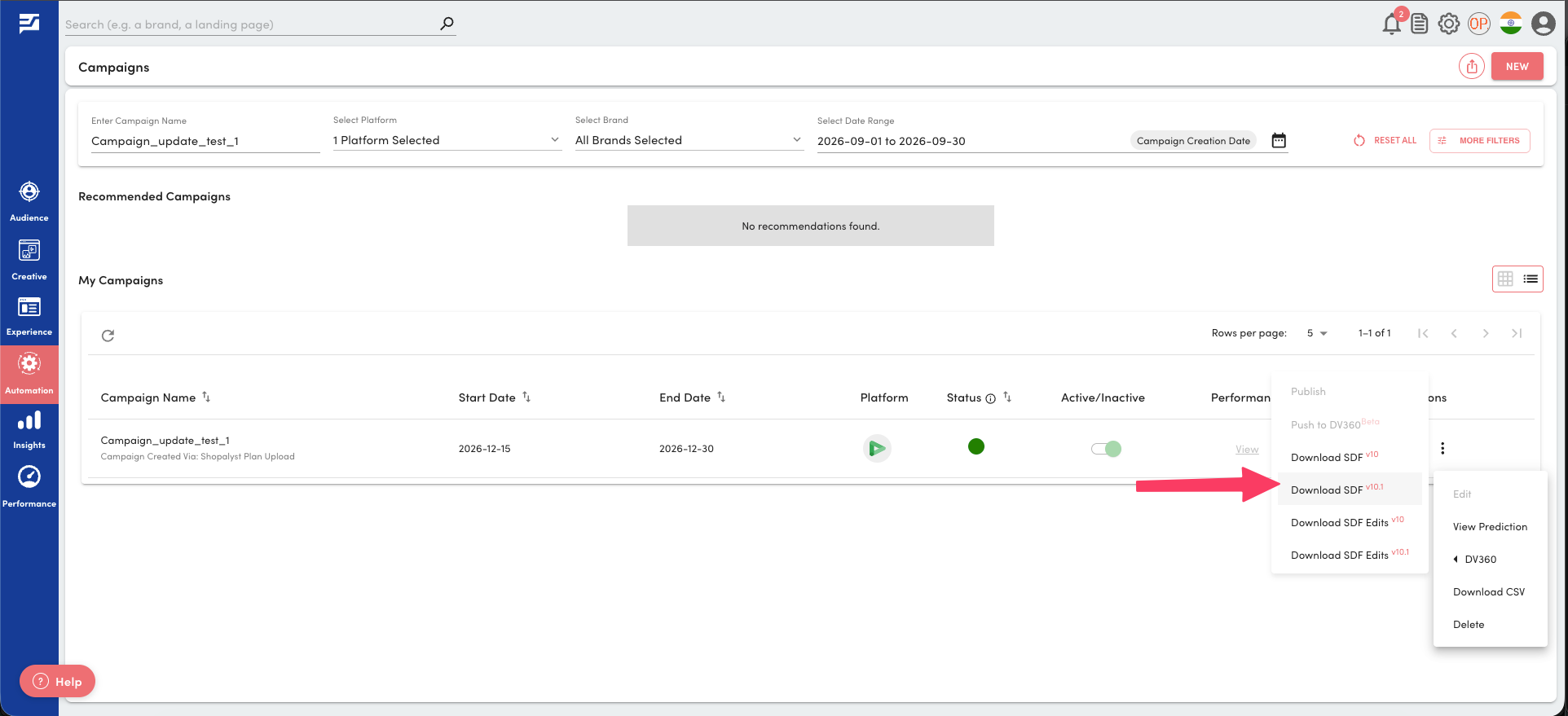
Upon a successful SDF fetch from your campaign via Discovery Commerce, you will receive both a notification within the Discovery Commerce dashboard and an email. These notifications provide you with the option to download the fetched SDF files.

DV360 targeting alignment with latest SDF format
As part of Google's latest DV360 updates, targeting can no longer be set at the Campaign or Insertion Order (IO) level. If you have been applying targeting at these levels, please note that this is no longer supported.
Going forward, when you want to define or make changes to your targeting such as the audience you want to reach, the locations you want to target, or the devices you want to serve ads on you will need to do so at the Line Item or Ad Group level.
When you publish your campaign and download the SDF file, you will notice that targeting fields at the Campaign and IO levels will appear empty. This is expected behavior and is fully aligned with the latest DV360 guidelines your campaign will still run correctly.
This applies to all targeting types you may use in your campaigns:
Locations
Genders
Age ranges
Audiences
Affinity & In-Market
Keywords
Devices
Languages
Household income
Life events
Regardless of which SDF version you are using, this applies to all SDF files both Campaign and Insertion Order generated and downloaded through Shopalyst Discovery Commerce Cloud. No changes to your upload template or workflow are needed; just ensure your targeting is set at the Line Item or Ad Group level before publishing. To know more about the SDF deprecation click here.
Instructions to reach out to support are here.